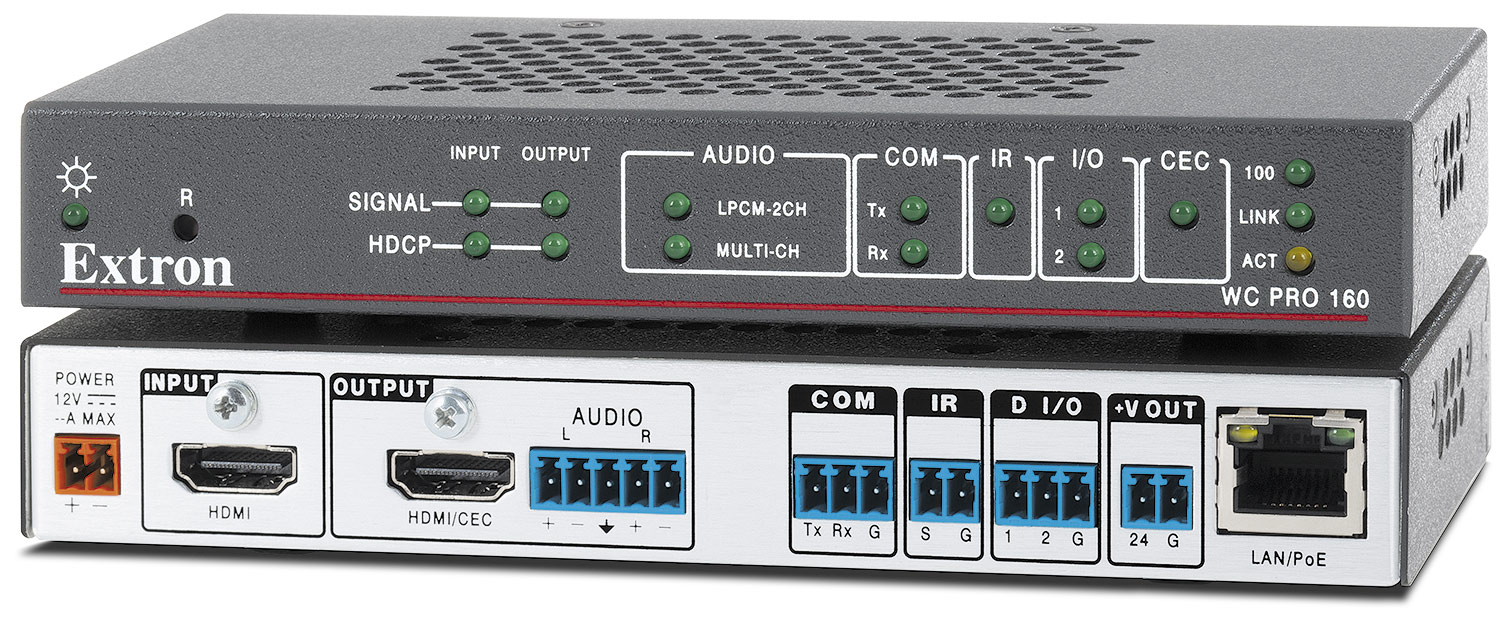
WC Pro 160はEDID Minderを装備したコンパクトサイズのイーサネット対応ワークスペースオートメーションコントローラーです。あらゆるサイズのワークスペースに、簡単でセキュアなディスプレイ電源の制御を実現します。購入後の設定は不要、アクティブな信号をHDMI入力に接続するだけでディスプレイの電源をオンにします。別売りの在室センサーを利用して、入室者を検知するとディスプレイの電源をオン、人の動きが検出されなくなると電源をオフにすることが可能です。さらに、内蔵WebページからイーサネットまたはRS-232/IRによる1台のディスプレイの自動化の設定が可能です。WC Pro 160はコンパクトな金属製筐体に収容、ディスプレイの背面やテーブルの天板下にすっきりと設置可能です。
Provide an automation device for display power control in small to medium sized workspaces
CEC enabled automation device for out of the box room display power automation
Provide a 12-volt DC input on a captive screw connector located on the back of the device allowing for power of the device
Provide a female HDMI input located on the back of the device that supports computer and video resolutions up to 4K/60 @ 4:4:4
Provide a female HDMI output located on the back of the device that supports computer and video resolutions up to 4K/60 @ 4:4:4 and features CEC control of the connected display if supported
Provide a five-pole captive screw connector for de-embedded HDMI analog audio
Device shall include a way to manage the EDID settings to ensure that the connected display shows the proper output regardless of the source used
Provide a configurable RS-232 port on captive screw connectors located on the back of the device that can be configured for unidirectional or bidirectional control of AV system components
Provide an IR port on captive screw connector located on the back of the device for auxiliary AV device control. This port shall allow the control of two devices using a dual IR emitter.
Provide two digital I/O’s on a captive screw connector located on the back of the device that can be used to interface with devices such as sensors, switches, LEDs, and relays
Provide a 24-volt DC output on a captive screw connector located on the back of the device that can be used to power auxiliary devices such as a room occupancy sensor
Device shall have a female RJ-45 jack located on the back it that supports 10/100Base-T, half/full duplex with auto-detect for connection to a LAN or WAN and includes link and activity LED indicators located on the left and right of the jack for troubleshooting network issues as well as supports PoE- Power over Ethernet, 802.3af
Provide front panel LED activity indicators for power status, HDMI and HDCP signal presence, RS-232 status, IR status, digital I/O status, CEC status and network status
Provide a multi-function button located on the front of the device that allows for resetting to its default configuration or to factory firmware defaults
Device shall include Extron LockIt® HDMI cable lacing brackets
Device shall support the addition of an Extron LinkLicense® for WC Control Processor
Device shall support the use of TouchLink Pro touchpanels and Network Button Panels
Device shall have at least 8 GB of nonvolatile memory.
Supports a web-based AV resource management application that provides a means to manage, monitor, and control AV equipment.
Device shall support the following protocols: DHCP, DNS, HTTP, HTTPS, ICMP, NTP, SFTP, SMTP, SNMP, SSH, TCP/IP, UDP/IP
Device shall support the addition of an Extron LinkLicense® for user interfaces
Mounting requirements
Device shall be housed in a one-inch high 3/8 rack width designed for placement behind a display, above a projector or under a table
Device shall be rack mountable using an optional rack shelf
Device shall be able to be installed under a table, desk, or other flat surface using an included mounting kit
Software requirements
The device may be configured using Extron’s Global Configurator Plus or Professional once Extron Control for WC Control Processor is applied
Display drivers can be obtained directly from the built-in webpage or through Extron support resources and database
Shall be configured by an Extron authorized user
The device’s configuration and settings shall be managed using Extron’s Toolbelt software
The device's A/V settings and EDID shall be managed using Extron's PCS software
Security Requirements
Device shall support SFTP and SSH for secure communication between the automation device and a TouchLink Pro touchpanel or Network Button Panel
Device shall support HTTPS and SSH for secure communication between the automation device and Extron Control App
Device shall support HTTPS for secure communication between the automation device and Extron Control for Web
Device shall support SFTP and SSH for secure communication between the automation device and the configuration software
Device shall provide the option to modify administrator and user credentials
Device shall support security updates to maintain network health.
Device shall require a Secure Socket Layer (SSL) Certificate is installed to maintain system confidentiality and data integrity
Device shall support the installation of an owner furnished certificate with the following properties:
Certificates shall include x.509 support
Certificates shall include public / private key exchange
Certificates shall support PEM encoding
Extron shall furnish documentation that describes all supported network ports and services
Shall meet regulatory compliances
CE
c-UL
UL
C-Tick
FCC Class A
ICES
VCCI Class A
RoHs
WEEE
Device shall be UL listed for use in plenum air handling spaces: meets UL 2043 for heat and smoke release
Product Warranty
Shall provide at least 3 years parts and labor
Approved device shall be the Extron WC Pro 160, part number 60-1804-01, no alternates or equals
WC Pro 160
Provide an automation device for display power control in small to medium sized workspaces
CEC enabled automation device for out of the box room display power automation
Provide a 12-volt DC input on a captive screw connector located on the back of the device allowing for power of the device
Provide a female HDMI input located on the back of the device that supports computer and video resolutions up to 4K/60 @ 4:4:4
Provide a female HDMI output located on the back of the device that supports computer and video resolutions up to 4K/60 @ 4:4:4 and features CEC control of the connected display if supported
Provide a five-pole captive screw connector for de-embedded HDMI analog audio
Device shall include a way to manage the EDID settings to ensure that the connected display shows the proper output regardless of the source used
Provide a configurable RS-232 port on captive screw connectors located on the back of the device that can be configured for unidirectional or bidirectional control of AV system components
Provide an IR port on captive screw connector located on the back of the device for auxiliary AV device control. This port shall allow the control of two devices using a dual IR emitter.
Provide two digital I/O’s on a captive screw connector located on the back of the device that can be used to interface with devices such as sensors, switches, LEDs, and relays
Provide a 24-volt DC output on a captive screw connector located on the back of the device that can be used to power auxiliary devices such as a room occupancy sensor
Device shall have a female RJ-45 jack located on the back it that supports 10/100Base-T, half/full duplex with auto-detect for connection to a LAN or WAN and includes link and activity LED indicators located on the left and right of the jack for troubleshooting network issues as well as supports PoE- Power over Ethernet, 802.3af
Provide front panel LED activity indicators for power status, HDMI and HDCP signal presence, RS-232 status, IR status, digital I/O status, CEC status and network status
Provide a multi-function button located on the front of the device that allows for resetting to its default configuration or to factory firmware defaults
Device shall include Extron LockIt® HDMI cable lacing brackets
Device shall support the addition of an Extron LinkLicense® for WC Control Processor
Device shall support the use of TouchLink Pro touchpanels and Network Button Panels
Device shall have at least 8 GB of nonvolatile memory.
Supports a web-based AV resource management application that provides a means to manage, monitor, and control AV equipment.
Device shall support the following protocols: DHCP, DNS, HTTP, HTTPS, ICMP, NTP, SFTP, SMTP, SNMP, SSH, TCP/IP, UDP/IP
Device shall support the addition of an Extron LinkLicense® for user interfaces
Mounting requirements
Device shall be housed in a one-inch high 3/8 rack width designed for placement behind a display, above a projector or under a table
Device shall be rack mountable using an optional rack shelf
Device shall be able to be installed under a table, desk, or other flat surface using an included mounting kit
Software requirements
The device may be configured using Extron’s Global Configurator Plus or Professional once Extron Control for WC Control Processor is applied
Display drivers can be obtained directly from the built-in webpage or through Extron support resources and database
Shall be configured by an Extron authorized user
The device’s configuration and settings shall be managed using Extron’s Toolbelt software
The device's A/V settings and EDID shall be managed using Extron's PCS software
Security Requirements
Device shall support SFTP and SSH for secure communication between the automation device and a TouchLink Pro touchpanel or Network Button Panel
Device shall support HTTPS and SSH for secure communication between the automation device and Extron Control App
Device shall support HTTPS for secure communication between the automation device and Extron Control for Web
Device shall support SFTP and SSH for secure communication between the automation device and the configuration software
Device shall provide the option to modify administrator and user credentials
Device shall support security updates to maintain network health.
Device shall require a Secure Socket Layer (SSL) Certificate is installed to maintain system confidentiality and data integrity
Device shall support the installation of an owner furnished certificate with the following properties:
Certificates shall include x.509 support
Certificates shall include public / private key exchange
Certificates shall support PEM encoding
Extron shall furnish documentation that describes all supported network ports and services
Shall meet regulatory compliances
CE
c-UL
UL
C-Tick
FCC Class A
ICES
VCCI Class A
RoHs
WEEE
Device shall be UL listed for use in plenum air handling spaces: meets UL 2043 for heat and smoke release
Product Warranty
Shall provide at least 3 years parts and labor
Approved device shall be the Extron WC Pro 160, part number 60-1804-01, no alternates or equals
アイテムをカートに追加する
Order Message Number
製品番号
注: Extron products using the Universal AC Outlet accept a number of different AC plug types. Before use, ensure that the device meets all regulatory requirements for your region and complies with all applicable local safety and electrical codes and standards.
現在の合計金額:
WC Pro 160 -
Annotation Graphics Processor
To view this page ensure that Adobe Flash Player version
11.0.0 or greater is installed and enabled.